Linux Process
Created on: 2025-01-28
Tags: #Linux #Process
Course: HPC
Definition
- A process is an executing instance of a program.
- Each process in Linux has:
- Process ID
- Parent Process ID
- User ID
- State
- Linux process management involves the creation, monitoring and control of processes.
- Two types of processes:
- Background Processes: Run in the background allowed the terminal to be used for other tasks.
- To run a process in the background : command &
- Foreground Process: Run directly from the terminal and occupy it until they finish execution.
- Brings a background job to the foreground : fg %1
- Background Processes: Run in the background allowed the terminal to be used for other tasks.
- Process in Linux can be in various states
- Running (R)
- Sleeping/Waiting (S)
- Stopped/Finished (T)
- Zombie (Z)
Important Commands
- See/Display a list of running processes - ps
- List of all running process with full information without any regard to the current user - ps -ef
- See/Display the real-time information about the currently running processes - top
- Terminate/Kill the process - kill PID
- SIGTERM (15): Gracefully terminates a process, allowing it to clean up resources (Default).
- SIGTERM (9): Forces immediate termination of the process without cleanup.
- SIGSTOP (19): Pauses the process.
- SIGCONT (18): Resumes a paused process.
Multitasking v/s Multi-Threading
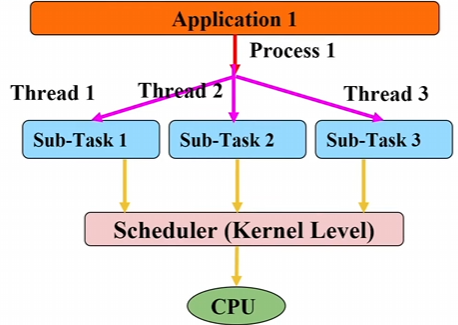
- Multitasking : Execution of multiple processes (Context Switching)
- Multi-threading: Execution of multiple threads in a process (Threads Switching)
Linux Text Processing
- Powerful commands for text processing, allowing users to manipulate, filter, search, etc.
- Search for patterns in a file : grep “pattern” fileName
- -n: Line number where the pattern is present.
- -r: to find in number of files and directories. Replace fileName with *
- Pattern scanning and processing - awk
- Printing selected columns: awk “{print $1 $3}” file.txt
- Filtering rows based on condition: awk ‘$3 == “M” {print $1}’ file.txt
- Using arithmetic operations: awk ‘{print $1, $2 * 2}’ file.txt
- Pattern Matching: awk ‘/John/ {print $0}’ file.txt
- Sort lines of text file - sort
- Sort alphabetically - sort
- Sort numerically - sort
- Reverse sort - sort -r
-
Omit repeated lines from a sorted file - *sort fileName uniq*
-
Pipe –> Passes the output of one command to the next command. - Count content of a file - wc
- -l - Lines
- -w - Words
- -c - Characters
- Print the first/last n lines - head/tail
- Compare files line by line - diff file1 file2
- Merge lines of the files - paste file1 file2
Linked from
- No other published notes link here yet.